


La administración de accesos es fundamental para garantizar la seguridad y el control operativo de su sitio web. Siga este protocolo técnico para habilitar nuevas cuentas de usuario de manera segura y eficiente:
1. Inicie sesión en su panel de control de WordPress.
2. Diríjase al menú lateral, seleccione la sección Usuarios y haga clic en Añadir nuevo.
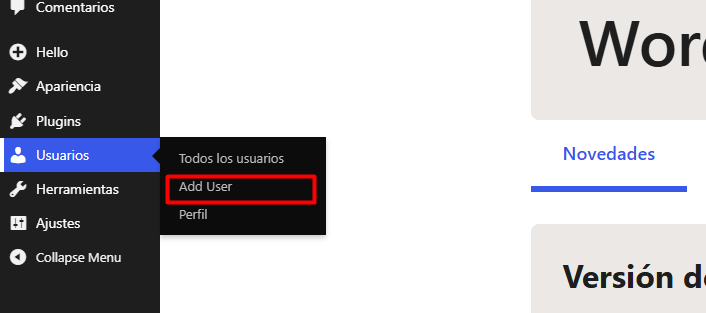
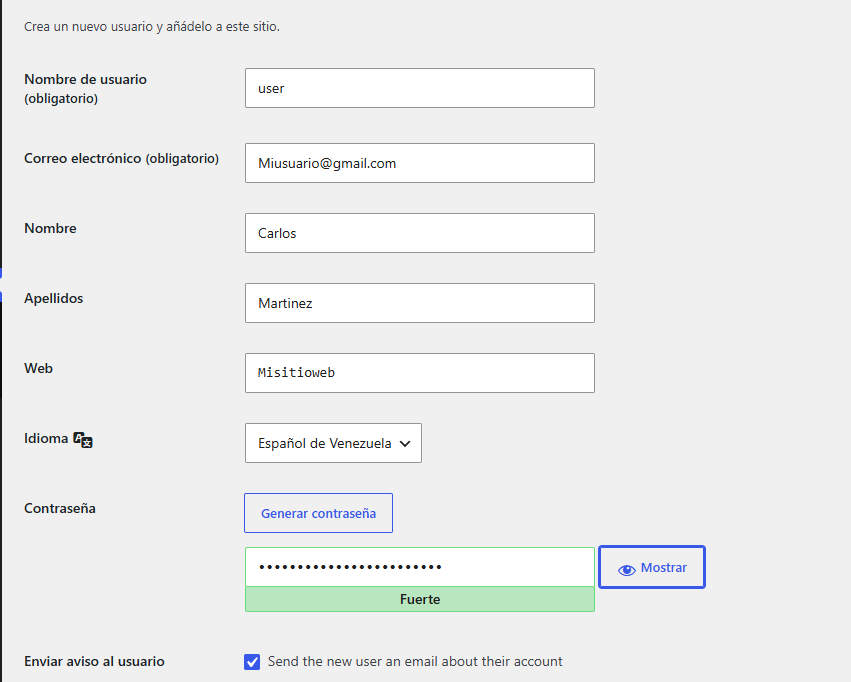
3.Complete los campos requeridos con la información del nuevo usuario en el formulario desplegado los campos que deben ser completados de manera obligatoria son :
3.1. Nombre de usuario: Seleccione un identificador único.
3.2. Correo electrónico: Utilice una cuenta corporativa válida; el sistema enviará automáticamente las instrucciones de acceso a esta dirección.
4. Seleccione el rol adecuado según las responsabilidades del usuario (Perfil) para mantener la integridad del sistema:
4.1. Administrador: Acceso total a todas las configuraciones del sitio.
4.2. Editor: Gestión de contenidos propios y de terceros.
4.3. Autor/Colaborador: Niveles de acceso limitados a la creación y gestión de contenidos personales.

5. Haga clic en el botón Añadir nuevo usuario. El sistema procesará el alta y notificará al usuario vía correo electrónico para la configuración de sus credenciales.
Notas de Seguridad:
• Por seguridad, recomendamos asignar siempre el rol más limitado posible según las tareas requeridas. Evite otorgar privilegios de Administrador salvo en casos de gestión técnica crítica.
• Asegúrese de que los nuevos usuarios utilicen contraseñas robustas. Si su entorno lo requiere, le sugerimos implementar protocolos adicionales como la Autenticación de Doble Factor (2FA) para usuarios con roles elevados.
• Revise periódicamente la lista de usuarios activos en su panel para asegurar que los accesos estén alineados con sus necesidades operativas actuales.
